



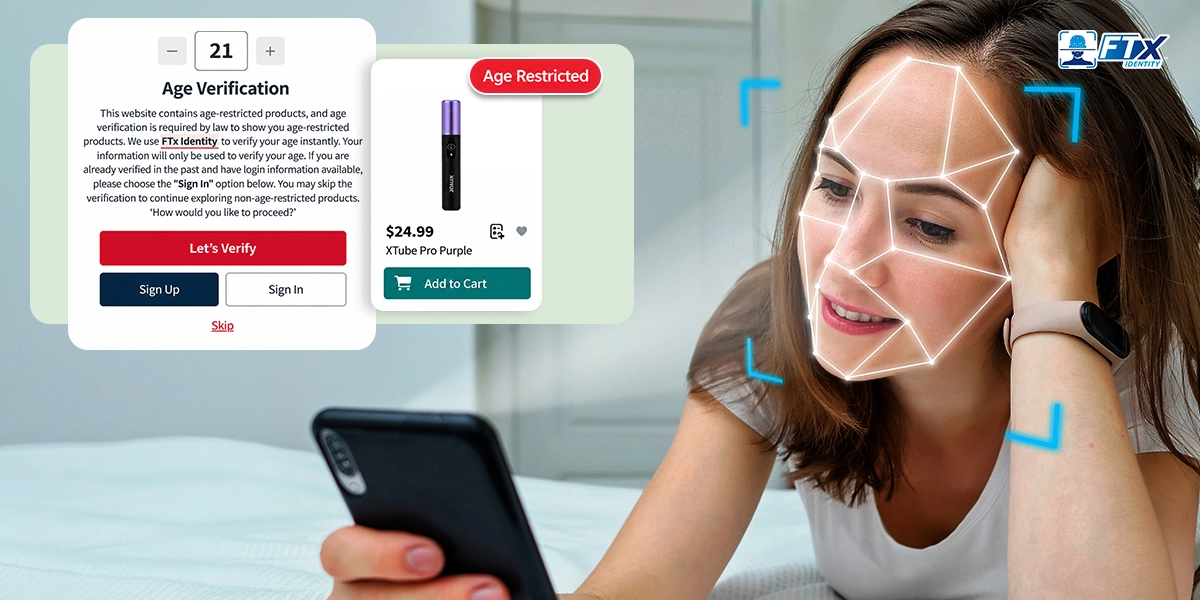
Do you sell alcohol, tobacco, vape, CBD, or other age-restricted products online through WooCommerce, or are you planning to start selling them online? Then you need a reliable way to check that buyers meet the legal age requirements for the products they purchase.
An underage sale can lead to fines, licensing issues, problems with payment processors, and other consequences. Rules also differ by state, so it’s important to understand the requirements that apply to your products and the locations you ship to.
Many online stores start with a simple age gate, a pop-up that asks shoppers to enter a birthdate or click “I am 21 or above.” However, this relies on self-declaration rather than independently confirming a shopper’s age. ID-based age verification goes further. It can check a government-issued ID, compare the ID photo with a live selfie, and record the verification result.
This guide explains WordPress age verification and WooCommerce ID verification. You will learn where to add checks in the customer journey, which best practices to follow, and how FTx Identity can connect to your store through an age verification application programming interface (API).
- WooCommerce age verification confirms whether a shopper meets the applicable age requirements before purchasing age-restricted products, using a plugin or an age verification API.
- A pop-up or age gate relies on self-declaration and can be bypassed, so it should not be treated as a substitute for stronger verification when required.
- ID-based verification, with a government ID check and a live selfie, can provide additional evidence of a shopper’s age and a record of the verification result.
- Checkout is an important place to enforce age checks, with additional options at the site, product, category, add-to-cart, registration, and delivery stages.
- FTx Identity can connect with third-party software through APIs, with integration requirements and testing determined by the store’s setup.
What Is WooCommerce Age Verification?
WooCommerce age verification is the process of confirming that a shopper meets the legal age requirement before they can view or buy age-restricted products in your store. It can run through a plugin or through an age verification API that connects your store to a verification service.
The method can be simple, such as a birthdate entry, or stronger, such as checking a government-issued ID and comparing its photo with a live selfie. The level of evidence available depends on the verification method and the records it provides.
Is an “Are you 21?” pop-up enough? Not necessarily. A pop-up relies on the shopper’s honesty and doesn’t independently verify their age. Use it as a first layer where appropriate and consider ID-based verification when stronger age checks are needed.
Why WooCommerce Stores Need Age Verification
Selling age-restricted products online carries responsibilities similar to those involved in selling them in person, although the checks may need to work differently online. Age verification for WooCommerce can help retailers address these requirements.
Here is why it matters:
1. Sell Age-Restricted Products Responsibly
Customers and regulators expect online sellers to take age limits seriously. A solid check shows you are a responsible retailer, not just a store with a pop-up. It also keeps your online process consistent with the checks you would do in person.
2. Reduce Underage Purchases and Fraud
Anyone can type a fake birthdate, which is why age gates alone may not be enough. ID-based checks add another layer of verification. When a shopper must show a valid ID and complete a live selfie check, it may be harder to get through the process using false information. Liveness checks can also help identify certain attempts to use a photo or other presentation in place of a live person.
3. Support Compliance and Brand Protection
A self-reported birthdate may not meet the requirements that apply to every age-restricted product or location. A verification record may help document that a check took place, depending on the information the service records and makes available. It can also help protect your brand, since one underage sale can damage trust with customers and payment partners.
Why WooCommerce Is So Popular for Ecommerce
WooCommerce has become a popular ecommerce platform for business owners. Its range of available extensions and customization options make it a useful option for businesses of different sizes.
With the growing popularity of selling age-restricted products online, it’s important to consider how you’ll verify customers’ ages and meet the requirements that apply to your products.

The Challenge of Age Verification
Selling age-restricted products online requires a way to confirm that customers meet the applicable age requirements. This can be challenging, as each region may have different laws and regulations regarding age verification. Implementing an appropriate age verification system for WordPress can help you address these requirements and reduce the risk of potential penalties.
Protecting Your Business: Different Verification Methods
There are various approaches to verifying your customers’ ages, including the following:
Pop-Up Verification
Pop-up verification is a common and straightforward method where users confirm their age through a pop-up window. It’s easy to add to a website, but because it relies on self-declaration, it doesn’t independently confirm a shopper’s age.
Age-Gated Content
Age-gated content restricts access to specific pages or products based on age verification. This method can limit access to certain content or products until users complete the required step. However, a basic age gate does not necessarily verify a person’s actual age.
Solution 1: Age Verification Plugins for WooCommerce & WordPress

Using plugins is one of the easiest ways to implement age verification on WordPress or WooCommerce. These plugins can be configured to meet some basic age-checking needs, depending on the plugin and its features.
Overview of Plugins
Plugins offer pre-built solutions that require minimal setup. They may include features like customizable pop-ups and different ways for visitors to confirm their age.
How Do Plugins Work?
Many age verification plugins work by adding a pop-up or form to your website, asking users to confirm their age before they can proceed. Some plugins offer additional features like birthdate entry fields and checkbox confirmations.
Who Should Use Plugins?
Using a plugin may be a good fit if you’re looking for a quick and cost-effective way to add age verification to your site. This can suit smaller businesses or those looking to get started quickly, provided the plugin meets their verification requirements.
Top Age Verification Plugins for WooCommerce and WordPress
- WooCommerce Age Verification Pop-Up: An easy-to-use and customizable pop-up feature for WooCommerce stores. It can ask customers to confirm their age before they access age-restricted products.
- Age Gate (for WordPress Websites): A WordPress plugin designed to restrict access to a website or selected pages until visitors complete an age confirmation step.
- WPForms (Age Verification Add-On): This add-on for the popular WPForms plugin can add age-related fields to forms. Check the current add-on features and configuration options to confirm whether they meet your specific verification needs.
Best Use Cases for Plugins
Plugins can be a practical option if your goal is to implement a simple, cost-effective solution quickly. They may be suitable for small to medium-sized businesses that need basic age checks without extensive customization. However, confirm that the plugin provides the level of verification required for your products and locations.
List of Ways to Use Plugins:
1. Pre-Built Pop-Ups: Customizable pop-up windows ask visitors to confirm their age.
2. Flexible Age Verification Options: Choose how users confirm their age, such as entering a birthdate or checking a confirmation box, depending on the plugin.
3. User-Friendly Configuration: Many plugins offer settings through the WordPress or WooCommerce dashboard. Plugin settings can be adjusted based on the options available.
4. Multiple Customization Options: Some plugins let you change the layout, design, and content of your age verification pop-up to match your brand or website theme.
5. Compatibility with Different Themes: Plugin compatibility varies, so check whether your chosen option works with your WordPress theme.
6. Integration with Other Plugins: Some plugins support integrations with other tools. Check the available integrations before choosing a plugin.
7. Targeted Content Display: Depending on the plugin, you may be able to choose which pages or posts the age verification pop-up appears on, allowing you to target specific content or products.
Pros:
Easy to Install and Configure
Plugins are designed to be user-friendly, and many require little or no coding for basic setup. With just a few clicks, you may be able to add an age confirmation step to your site.
Cost-Effective
For those with basic age verification needs, plugins may offer a cost-effective solution. You won’t need to invest in custom development for every basic age-checking feature.

Wide Variety
The market offers a range of plugins, each offering different features and configuration options. This allows you to choose one that fits your specific requirements, whether you need simple verification or more advanced options.
Regular Updates
Some plugin developers release regular updates to their products, which can help maintain security and compatibility. Check the developer’s update history and compatibility information before installing a plugin.
User-Friendly Design
Plugins often include settings designed to make them easier to manage. The visitor experience will depend on the plugin’s design and how you configure it.
Cons:
Limited Functionality
While many plugins are great for basic tasks, they often lack the advanced features that some businesses might require. For highly specialized or complex needs, a plugin might not provide everything you need.
Compatibility Issues
Not all plugins are created equal, and some may have compatibility issues. They might not integrate seamlessly with all website themes or other plugins, which can lead to functionality problems.
Site Speed
Adding multiple plugins to your website can affect performance, depending on how they’re built and configured. Poorly optimized plugins can affect your site’s performance, leading to longer load times and a less positive user experience.
Security Risks
As with any third-party software, using plugins can pose potential security risks if they are not regularly updated or come from untrustworthy sources. It’s essential to research and choose reputable plugins from trusted developers.
Limited Control
With a plugin, you are relying on the developer for updates and bug fixes. This means you have limited control over when new features or fixes will be released, which could impact your age verification system’s reliability.
Where to Add Age Verification in the WooCommerce Customer Journey
You can place age checks at several points in your store. The right choice depends on your products, the requirements you need to meet, and how much friction your shoppers will accept. Many stores combine two or three of these approaches.
Site-Wide Age Gate
A site-wide gate appears when someone first lands on your store. It suits stores where every product is restricted. Treat it as a first layer only, since it relies on self-declaration and may need to be supplemented with stronger verification.
Product-Level Verification
Use this when only a few items are restricted. You flag specific products, and verification triggers only when a shopper tries to view or buy them. It works well for general stores that sell one or two regulated items.
Category or Tag-Level Verification
Apply rules to a whole category, such as wine or vape, or to products with a tag like “21+”. This can make it easier to manage restrictions as you add products, provided new items are assigned to the correct category or tag.
Add-to-Cart Verification
Trigger the check when a shopper adds a restricted item to the cart. Browsing stays smooth, and verification appears only when intent to buy is clear. It can also accommodate mixed carts that include both restricted and unrestricted items, if the checkout rules are configured accordingly.
Checkout Verification
WooCommerce age verification at checkout provides a final opportunity to verify a customer’s age before completing a purchase. Block the order until the check passes, and verify the customer before capturing payment. Apply verification only when the cart contains restricted products.

Account Registration Verification
Verify customers once at signup and store their verified status for future orders. This can make repeat purchases more convenient, but a previous check may not be enough for every transaction. Pair this with ongoing authentication, where appropriate, to help confirm that the person using the account is the verified account holder.
Post-Purchase or Delivery Verification
For selling alcohol online, the check can continue at the door. Drivers or carriers may need to confirm the recipient’s age and identity at delivery, depending on the product and applicable rules. This can address situations that checkout verification alone may not cover.
Where your payment setup and applicable rules allow it, verify before payment is captured, and only for carts that contain restricted products. That can help avoid adding unnecessary steps for customers buying unrestricted items.
Solution 2: Custom Development with Age Verification APIs
Another option for age verification is to use an age verification API. This allows for more customization and control over the verification process, enabling businesses to tailor the solution to their specific requirements and connect a verification service to their existing website.
How Age Verification APIs Work
Age verification APIs work with third-party services to perform secure and reliable age checks. The best ID verification APIs can be customized to fit a business’s needs, allowing it to set verification criteria, such as requesting additional identification documents or cross-checking information from different sources.
Differences Between Plugins and APIs
Indeed, plugins are a quick and easy solution for implementing age verification. However, they often come with limitations in terms of customization and scalability.
On the other hand, APIs offer a more customizable option for businesses with complex age verification needs or those desiring more control over the verification process. APIs can also support integration with other systems and reporting tools, depending on the service and implementation.
Best Use Cases for APIs
APIs may be a good fit for larger businesses or those with specific compliance needs. They can support more tailored verification workflows and integration with existing systems.

Key Points About APIs
- Advanced Verification Methods: Use third-party age verification services that offer verification methods suited to your products and requirements. Available checks vary by provider.
- Integration with Your Website: Tailor the age verification process to your specific needs and website design, based on what the API and your website support.
- Greater Control: Define detailed rules for restricted content and user access, where those rules are supported by your integration.
Pros:
Customizable Solution
This option allows for extensive customization to meet your specific needs, with security depending on the verification service and how the integration is implemented.
Can Integrate with Your Website and Existing Plugins
An API integration can work with your existing website and plugins, depending on compatibility and development requirements.
Ideal for Complex Age Verification Requirements
If your business has complicated age verification needs, this solution can be tailored to address those complexities effectively, ensuring compliance and reliability.
Easy to Use for Both Businesses and Customers
The age verification process is simple, quick, and user-friendly, making it convenient for both businesses and customers alike.
Can Be Used Across Multiple Platforms
This can be implemented on various platforms, such as desktops, mobile devices, or tablets, providing a consistent experience for all users.
Cons:
Requires Technical Expertise or Hiring a Developer
Implementing this solution may necessitate a certain level of technical knowledge, or alternatively, you might need to hire a developer to handle the setup and customization for you.
Can Be More Expensive Than Using a Pre-Built App
Due to the high level of customization and security features, this solution can be more expensive compared to off-the-shelf applications that offer more generic functionality.

Requires Regular Maintenance and Updates
As an API-based solution, it may require more frequent updates to maintain its security and functionality, which can add ongoing costs to your business.
May Have Limitations in Terms of Compatibility with Certain Platforms or Systems
Depending on your specific setup, this solution may not be compatible with all platforms and systems, which could limit its usability for some businesses.
May Require Additional Steps for Customer Verification
While the age verification process is simple for users, it may require additional steps such as uploading documents or filling out extra information, which could potentially cause inconvenience for some customers.
FTx Identity is a solution for verifying age and identity. It integrates with third-party software through APIs, allowing businesses to incorporate verification into supported workflows, such as online transactions or account creation.
Best Practices for WooCommerce Age Verification
A good setup balances compliance, security, and ease of use. These best practices help you avoid common gaps.
1. Map Risk Before Choosing a Tool
List your restricted products, the states you ship to, and your order volume. A small store with simple needs may be fine with a WooCommerce age verification plugin. A store with complex rules or higher volume often needs an age verification API for more control and reporting.
2. Use Layered Verification
Combine methods instead of relying on one. For example, use an age gate for awareness, ID verification at checkout, and a selfie with liveness detection where supported. Depending on your verification service, you may also be able to add checks for higher-risk orders, such as those involving large quantities or mismatched addresses.
3. Enforce Verification at Checkout
Do not rely only on front-end pop-ups that customers can skip. Make sure the order does not complete until verification passes, and ensure the integration validates the result on the server side where supported. This helps reduce the risk of shoppers bypassing the process through browser-side changes.
4. Optimize for Mobile
Most shoppers will verify from a phone. Use clear instructions, easy camera capture, and a layout that fits small screens. Test the full flow on different devices, since a clunky mobile process increases abandoned carts.

5. Be Transparent About Data Use
Tell customers what you collect, why you collect it, and how long it is kept. Collect only what you need, and follow privacy laws that apply to you, such as the CCPA (California Consumer Privacy Act) or the GDPR (General Data Protection Regulation). Ask your provider how they store and delete personal data.
6. Plan for Edge Cases
Build your WooCommerce site to handle unusual, fraudulent, or unintended behavior without breaking compliance rules or frustrating real customers. Plan for blurry ID photos with easy retake, expired IDs, guest checkout, and mixed carts. Decide what happens when a check fails, such as a retry limit or manual review.
7. Keep Verification Rules Current
Age laws and product rules change, and they vary by state. Review your rules regularly, update category and tag settings when you add products, and retest after WooCommerce or plugin updates. A setup that was compliant last year may not be today.
Age rules vary by state and by product. Confirm the requirements for every state you ship to before you launch and review them regularly.
How FTx Identity Helps WooCommerce Stores Verify Age and Identity
FTx Identity is an age and identity verification solution for ecommerce. It combines ID checks, liveness detection, and data extraction, and it logs each verification as proof . Customers verify with a government ID and a live selfie, and your store gets a clear result to act on.
Our solution supports integration with WordPress and WooCommerce through software development kit (SDK) and application programming interface (API) options, so you can add ID checks at checkout, registration, or other points in your online store.
How to Integrate FTx Identity with WooCommerce
Follow the simple steps to integrate FTx Identity with your online WooCommerce store.
Step #1: Contact the FTx Identity team:
Reach out to schedule a consultation or demo. The team walks you through how verification works and what fits your store.
Step #2: Share Your Requirements:
Tell the team which products need verification, which states you ship to, and where you want to verify, such as checkout, registration, or delivery. Share details about your WooCommerce setup so the right approach is chosen.
Step #3: Implement the API & Test:
Your developer connects your store to the FTx Identity age verification API and adds the verification step where you need it. Run test orders, including failed checks, retakes, and mixed carts, before launching.
Step #4: Go Live:
Launch the verification flow on your live store. Then review your verification records and adjust rules as your products, states, and customer needs change.
Wrapping Up…
Selling age-restricted products on WooCommerce comes with a clear responsibility: take appropriate steps to verify that buyers meet the applicable age requirements and keep records of verification results where available.
A pop-up or age gate can be a helpful first layer, but it relies on honesty and doesn’t independently verify a shopper’s age. ID-based age verification can add an ID check, a live selfie, and a record of the result, depending on the service used.
The right approach depends on your store’s requirements. A plugin can work for basic age checks, while an age verification API may offer more control and integration options for stores with more complex requirements or higher order volumes. Whichever you choose, enforce verification at checkout, plan for edge cases, and review your rules as laws change.
FTx Identity connects to your store through API options, so you can add reliable age and identity checks without slowing down real customers.
Ready to add real ID checks to your WooCommerce store? Move beyond a pop-up that shoppers can click past. Schedule a demo with FTx Identity and see how age and identity verification can fit your checkout.